Your own personal OS.
Slide is a personal live Linux distribution built for portability, privacy and speed.
Able to boot from any HDD or USB drive on (almost) any x86_64 machine.
It's anonymous, fast, and works leaving no trace behind it.
Powered by Debian, Slide can provide full solutions either for basic browsing to detailed, specific and complex operations...
Why Slide
Built different.
By design.

Anonymous by
default.
Created aiming at an anonymous desktop — Tor is working from scratch, out of the box. It turned out to be faster than any desktop available out there.
Doubled swap size to increase free memory available, even on old or RAM-limited computers. 4 GB is the beginning of decency, but Slide can run on 2 GB with certain restrictions — making surprisingly old hardware fully usable, especially machines with a powerful CPU like any old Mac.
It also provides a more secure environment for user data, since the OS is not writable (Live system) and physically separated from personal files.
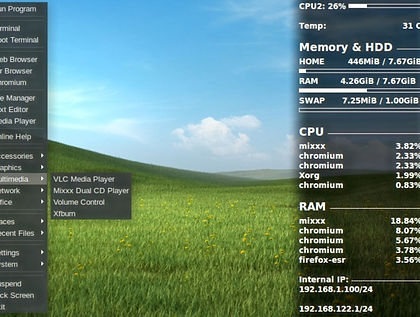
No install.
No stock apps.
The main OS is Debian-powered with no extras except the minimal apps required to work properly — it sticks below 1 GB in size.
You don't install Slide. Just copy all included files to your USB and remember to keep it plugged in when installing rEFInd. Apps can be added directly from Debian repositories to a modules folder using a script named APT2FS — it converts any Debian app into a module directly.
OS updates are done securely: unsquash your Slide, chroot in, update from Debian repositories, then recreate the main OS. Clean, controlled, repeatable.

Fast.
Really fast.
Slide uses a high compression algorithm to achieve its surprising size — a full desktop with many apps in about 1 GB. But since Slide performs mostly in memory, any decent pendrive is a candidate to host its power.
Performance is seamless and flawless compared to very expensive PCs. Linux can perform far better than most operating systems while providing alternatives to any software available.

Limitless
modularity.
Once you get used to this approach you'll appreciate its sides: portability, speed, and small footprint. Low hardware usage boosted by increased security and specificity will provide a deeply personal desktop experience.
Module creation is a simple process that lets you modify and configure the system to your will. You can create your own scripts and programs for almost anything. The system is yours — truly.
...You'll see.
What you get
Every feature,
a reason.
Technical specs
Under the
hood.
Getting started
Up and running
in minutes.
dd to write the ISO to a USB drive of 1 GB or more.Get Slide
Free.
Always.
Slide Linux is and will always be free. Enter your email to receive a direct, single-use download link. No account, no tracking, no spam.
One link per email · Single use · Expires in 24h
We never share or store your address beyond delivery.